Getting Started
Go from zero to retrieving bills in 6 steps with the official billerapi Node SDK. This guide uses the sandbox environment with test data — no real accounts needed.
Working with an agent?
Read https://www.billerapi.com/llms.txt first, then help me evaluate BillerAPI in the sandbox.

Check npm view billerapi-cli version. It must equal 1.1.0; if it differs, stop and refresh the public index instead of substituting another version. Run npx -y billerapi-cli@1.1.0 demo for the account-free, read-only biller-catalog walkthrough. Account-free sandbox creation is not enabled in production: do not run sandbox create or call the hosted create_claimable_sandbox tool (both answer error_code NOT_IMPLEMENTED), and do not work around that refusal. If I have already run billerapi setup with a bak_test_ key from my own portal account, use that sandbox profile to run npx -y billerapi-cli@1.1.0 sandbox-first-bill --client-user-id agent-onboarding and retrieve the first sb_utility bill; otherwise skip that step and never ask me to paste a key. Then run npx -y billerapi-cli@1.1.0 agent setup --dry-run, show me its secret-free receipt, and wait for approval. Apply only with npx -y billerapi-cli@1.1.0 agent setup --expected-bundle-sha256 <reviewed_bundle_sha256> using the exact digest I approved.

Summarize the billers returned by the demo and, if you retrieved one, the first normalized bill, and report coded errors by error_code. Do not create an account, construct or handle a password, accept legal terms, request a live key, or use a bak_live_ key on my behalf.
Create a Developer Account
Sign up at the Client Portal. There's no email round-trip to get started — creating your account signs you in immediately and drops you on the dashboard with a working sandbox key already minted.
- Go to the Client Portal and click Sign Up
- You're signed in right away and land on your developer dashboard
- Your sandbox
bak_test_key is ready to copy — start building
Note
Get Sandbox Credentials
Your sandbox key is on the dashboard the moment you sign up. Grab it from the Keys page (or the “Make your first API call” card on the dashboard). It's a self-contained Bearer token, so it's the only credential you need.
Note
bak_test_ prefix (production keys use bak_live_). The SDK reads the prefix and targets the matching environment (https://sandbox.api.billerapi.com for sandbox) automatically — you never set a base URL.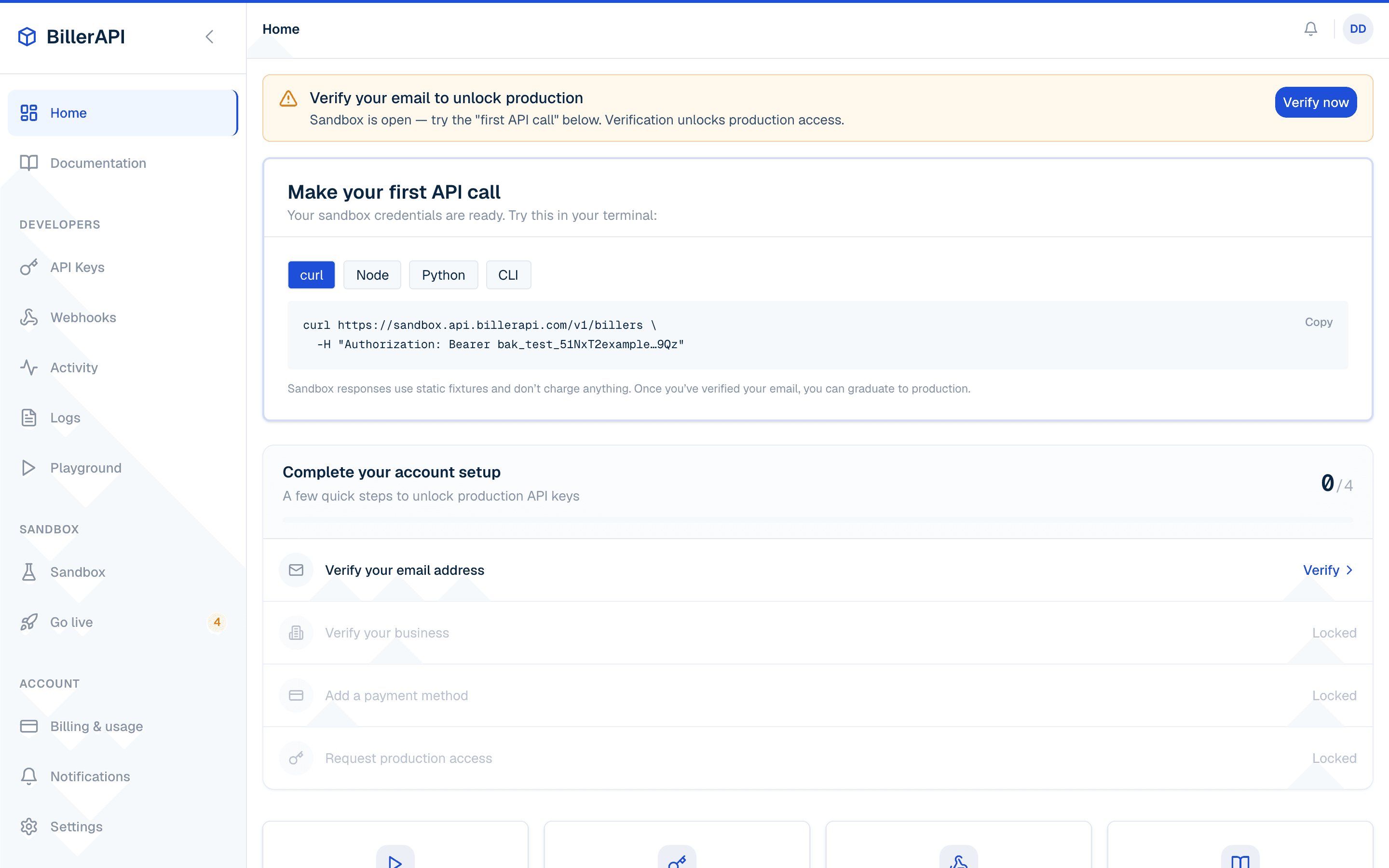
Install the SDK & List Billers
Install the SDK, then list available billers — the simplest call to verify your key works.
Install
npm install billerapiList billers
import { BillerApi, BillerApiError } from 'billerapi';

export async function listBillers(
  apiKey: string,
  log: (line: string) => void = console.log,
): Promise<void> {
  const billerapi = new BillerApi(apiKey);
  try {
    for await (const biller of await billerapi.billers.list()) {
      log(`${biller.id} ${biller.name} ready_for_bills=${biller.ready_for_bills}`);
    }
  } catch (error) {
    if (error instanceof BillerApiError) {
      log(`${error.code} request_id=${error.requestId ?? "unknown"}`);
    }
    throw error;
  }
}
HTTP reference (no SDK)
curl https://sandbox.api.billerapi.com/v1/billers \
  -H "Authorization: Bearer $BILLERAPI_API_KEY"
Tip
Link a Test Account
Linking is a two-part flow: your server creates a link token, then the browser SDK handles the user experience and returns a public token you exchange server-side.
Server: Create a link token
import { BillerApi } from 'billerapi';

export async function createLinkToken(apiKey: string) {
  const billerapi = new BillerApi(apiKey);
  return billerapi.links.createToken({
    client_user_id: 'user_123',
    biller_id: 'sb_utility',
    consents: ['bills:read'],
  });
}

// Send link_token to Connect. Keep link_token_id on your server.
HTTP reference (no SDK)
curl -X POST https://sandbox.api.billerapi.com/v1/link-tokens \
  -H "Authorization: Bearer $BILLERAPI_API_KEY" \
  -H "Content-Type: application/json" \
  -d '{
    "client_user_id": "user_123",
    "biller_id": "sb_utility",
    "consents": ["bills:read"]
  }'
Server: Inspect continuation state
Keep link_token_id on your server. This status is authoritative: use next_action, blocking_reason, andretryable instead of inferring progress from elapsed time.
import { BillerApi, type LinkTokenStatusResult } from 'billerapi';

export async function inspectLinkToken(
  apiKey: string,
  linkTokenId: string,
): Promise<LinkTokenStatusResult> {
  const billerapi = new BillerApi(apiKey);
  const continuation = await billerapi.links.retrieveTokenStatus(linkTokenId);

  if (continuation.next_action === 'RETRY' && !continuation.retryable) {
    throw new Error('Connect retry was not approved');
  }
  return continuation;
}
Client: Open the Connect flow
import { BillerApiElements } from 'billerapi-js';

export function openConnect(clientId: string, linkToken: string): void {
  const elements = new BillerApiElements({ clientId, environment: 'sandbox' });
  elements.connect({
    linkToken,
    onSuccess: async (publicToken, metadata) => {
      if (metadata.completion_mode === 'update') return;
      await fetch('/api/exchange-token', {
        method: 'POST',
        headers: { 'Content-Type': 'application/json' },
        body: JSON.stringify({ public_token: publicToken }),
      });
    },
    onExit: (error) => {
      if (error) {
        console.error(error.code, error.blocking_reason, error.next_action, error.retryable);
      }
    },
  }).open();
}
Sandbox test credentials
4242424242 with any username and password. This always succeeds. See the sandbox reference table below for other test scenarios.Server: Exchange the public token
import { BillerApi } from 'billerapi';

export async function exchangeToken(apiKey: string, publicToken: string) {
  const billerapi = new BillerApi(apiKey);
  return billerapi.links.exchangeToken({ public_token: publicToken });
}
HTTP reference (no SDK)
curl -X POST https://sandbox.api.billerapi.com/v1/link-tokens/public-sandbox-.../exchange \
  -H "Authorization: Bearer $BILLERAPI_API_KEY" \
  -H "Content-Type: application/json" \
-d '{}'Retrieve Bills
Use the link_id from Step 4 to fetch bills for the linked account. Bills are scoped to your API key — you pass the link, not the access token.
Read money and dates from the canonical fields: total_amount (an ISO 20022 object with value and currency) and due_date_iso (YYYY-MM-DD). The REST plane still returns the deprecated amount / currency / due_date trio alongside them for back-compat; the 2.0 Node SDK Bill type no longer exposes it.
Fetch bills
import { BillerApi, type Bill } from 'billerapi';

export async function listBills(apiKey: string, linkId: string): Promise<Bill[]> {
  const billerapi = new BillerApi(apiKey);
  const bills: Bill[] = [];
  for await (const bill of await billerapi.bills.list({ account_link_id: linkId })) {
    bills.push(bill);
  }
  return bills;
}
HTTP reference (no SDK)
curl "https://sandbox.api.billerapi.com/v1/bills?account_link_id=$LINK_ID" \
-H "Authorization: Bearer $BILLERAPI_API_KEY"Listen for Webhooks
Register a webhook for the durable confirmation chain. Connect completion does not mean bills are visible yet: wait for connection.ready, then consumebill.created and bill.updated.
Register a webhook endpoint
Register endpoints with the SDK (the signing secret is returned once — persist it immediately), or from the Client Portal under Developer → Webhooks.
import { BillerApi } from 'billerapi';

export async function createWebhook(apiKey: string) {
  const billerapi = new BillerApi(apiKey);
  const endpoint = await billerapi.webhookEndpoints.create({
    url: 'https://your-server.com/webhooks/billerapi',
    events: ['connection.ready', 'bill.created', 'bill.updated'],
  });
  if (!endpoint.secret) throw new Error('Webhook signing secret was not returned');
  return { id: endpoint.id, secret: endpoint.secret };
}
Verify incoming events
Verify and parse each event in one call with billerapi.webhooks.constructEvent(), which throws if the HMAC signature or timestamp doesn't check out.
import { BillerApi } from 'billerapi';

interface BillCreatedEvent {
  id: string;
  object: 'event';
  type: 'bill.created';
  api_version: string;
  created: number;
  data: { object: { id: string; object: 'bill'; user_id: string; biller_id: string } };
  request: { id: string | null; idempotency_key: string | null };
  producer_service: string;
  correlation_id: string | null;
}

export function verifyWebhook(
  apiKey: string,
  rawBody: string | Buffer,
  signatureHeader: string | undefined,
  webhookSecret: string,
): BillCreatedEvent {
  const billerapi = new BillerApi(apiKey);
  return billerapi.webhooks.constructEvent<BillCreatedEvent>(
    rawBody,
    signatureHeader,
    webhookSecret,
  );
}
Note
Develop locally with the CLI
No public URL yet? Use the BillerAPI CLI to stream live sandbox events straight to your local server — each event arrives as an HMAC-signed POST, exactly like production.
# Authenticate the CLI with a sandbox key
billerapi login --env sandbox

# Forward live events to your local server (HMAC-signed)
billerapi listen --forward-to http://localhost:4242/webhooks

# In another terminal, fire a test event into the sandbox
billerapi trigger bill.created
Sandbox Reference
Use these magic account numbers in the Connect flow to trigger specific scenarios.
| Account Number | Scenario | Behavior |
|---|---|---|
| 4242424242 | Success | Always succeeds. Returns a $127.50 pending bill. |
| 4000000001 | Auth Failure | Returns INVALID_CREDENTIALS error. |
| 4000000002 | Unavailable | Returns BILLER_UNAVAILABLE error. |
| 4000000003 | MFA Required | Prompts for MFA. Use code 123456. |
| 4000000004 | Locked | Returns ACCOUNT_LOCKED error. |
| 4000000005 | Past Due | Returns overdue bills ($245.00) with late fees. |
| 4000000006 | Auto-Pay | Returns a scheduled $89.99 bill with auto-pay enabled. |
| 4000000007 | Payment Plan | Returns 3 installments of $150.00 each. |
| 4000000008 | Multi-Account | Account discovery returns multiple accounts. |
Test Billers
| Biller ID | Name | Type |
|---|---|---|
| sb_utility | Sandbox Utility | Utility |
| sb_power | Sandbox Power | Utility |
| sb_gas | Sandbox Gas | Utility |
| sb_water | Sandbox Water | Utility |
| sb_electric | Sandbox Electric | Utility |
| sb_telecom | Sandbox Telecom | Telecom |